PasswordRadar is a password-screening API. It generates the weak passwords specific to your organisation from its domain (early access) and blocks them together with 20 billion leaked and weak ones, at sign-up, login and reset. The raw password never leaves your server.
Illustration: passwords that pass a 12-character rule and are still first guesses. Dots are leaked or common, rings are tailored for acme.example, a fictional organisation. Each sits in its real hash bucket, the only thing we learn about a password; categories are examples.Illustration: a radar scope. With JavaScript on, it plots passwords that pass a 12-character rule and are still first guesses, each in its real hash bucket.
A live check against the real API, with a public demo key. When you press Check, your browser salts and hashes the password and sends only the first six characters of the hash.
Ready
Type a password and press Check, or pick a sample.
// example run for password123
> hashing locally: sha1("Salted for knownpass.com: " + password)
= e4ed298fced32b284fb61840470dd5f9e030b568
> sending only the first 6 characters: GET /v1/range/e4ed29
< hundreds of full hashes come back, each with its categories
> comparing them with ours, locally: a match
final decision: "known"
The live demo needs JavaScript. The three steps below are the whole integration.
Tip: don’t type a password you really use into a site you don’t trust yet. Only a hash prefix leaves your browser here, but the habit is worth keeping.
The whole integration, in three steps
Hash locally
SHA-1 of the fixed, public salt plus the password, on your own server.
Send six characters
The first six hex characters pick one of 16,777,216 buckets. They and your API key are all we receive.
Compare locally
Hundreds of full hashes come back with their categories; how many depends on the datasets your key includes. If yours is among them, the password is known: block it.
The reference client is a single, self-contained JavaScript component, licensed Apache-2.0 (repository coming). Or implement the three steps yourself, so you never depend on our code.
import { createHash } from"node:crypto";
// 1. Hash locally. The salt stays exactly as written.const hash = createHash("sha1")
.update("Salted for knownpass.com: " + password)
.digest("hex");
// 2. Send only the first six characters.const prefix = hash.slice(0, 6);
const key = process.env.PASSWORDRADAR_API_KEY?.trim();
let known = false;
try {
const res = awaitfetch(
`https://api.knownpass.com/v1/range/${prefix}`,
{
headers: { Authorization: `Bearer ${key}` },
// 2 s: a new connection takes a few round trips
signal: AbortSignal.timeout(2000),
},
);
if (res.ok) {
// 3. Compare locally.// A match means the password is known.const { results } = await res.json();
known = Object.hasOwn(results, hash);
} else if (res.status === 429 || res.status >= 500) {
// over the daily limit, or our fault: fail open
console.warn("password check skipped:", res.status);
} else {
// 400, 401 or 403: your setup, not an outage.// The flow carries on, but nothing is screened// until you fix it. 401: check the key.
console.error("password check OFF: HTTP", res.status);
}
} catch (err) {
// a timeout, or the network failing before the answer// or during it (terminated): fail open. For "fetch// failed", the cause tells the network from your setup.const net = ["ECONNREFUSED", "ECONNRESET", "ENOTFOUND",
"EAI_AGAIN", "ETIMEDOUT", "EHOSTUNREACH", "ENETUNREACH",
"ENETDOWN", "EHOSTDOWN", "EADDRNOTAVAIL", "ECONNABORTED",
"EPIPE", "UND_ERR_SOCKET", "UND_ERR_CONNECT_TIMEOUT"];
const transient = err.name === "TimeoutError"
|| err.name === "AbortError"
|| err.message === "terminated"
|| (err.message === "fetch failed"
&& net.includes(err.cause?.code));
// log the cause as well; some messages quote the keyconst cause = err.cause?.message || err.cause?.code;
let why = cause ? `${err.message}: ${cause}` : err.message;
if (key) why = why.replaceAll(key, "[key]");
if (transient) {
// check again at the next login. (Every check skipped// behind a proxy? fetch ignores HTTPS_PROXY by default.)
console.warn("password check skipped:", why);
} else {
// won't fix itself: a stray character in the key,// Node before 18, a TLS failure (a proxy Node doesn't// trust, or a certificate problem on our side)
console.error("password check OFF:", why);
}
}
If the check can’t run, the sample fails open and the flow carries on. A timeout, a network error, 429 or 5xx is logged as a skipped check. A 400, 401 or 403 is logged as an error, and so is any other failure, such as a stray invisible character in the key, a Node version without fetch or a TLS failure: none of them fixes itself, and nothing is screened until it’s fixed. Each log line gives the cause. For 401, check the key.
The product was renamed; its company, KnownPass s.r.o., and the company’s domain were not. That is why the API host and the salt still carry the original name. The salt is part of every hash in the dataset, so it stays exactly as it is, and existing integrations keep working unchanged.
Live today
Plain REST from any stack, and the bulk download in every plan, Free included, for checks inside your own network. Your own code needs one REST request; an off-the-shelf identity provider such as Keycloak needs a small extension or script to make it. Ready-made ones are planned, and design partners get the first.
Coding assistants: llms.txt and OpenAPI 3.1
Point Claude Code, Cursor or Copilot at llms.txt or the OpenAPI 3.1 spec and ask for the integration: both tell it to hash on your server and send only the six-character prefix. Review the code it writes as you would any pull request: the raw password should never reach the model, your logs or our servers.
Coverage
20 billion unique passwords and weak patterns, plus, in early access, the ones your people would pick.
The 20 billion is the total across all categories of the base dataset, generated patterns included, not leaked passwords alone. The dataset keeps growing.
Specific to your organisation
Generated for each organisation
Tailored
early access
AcmeBrno2026! as a password? No longer an option. Tell us your domain and we generate the rest: names, products, places, years.
AI-generated
early access
Let a model guess your passwords from public information about your organisation, before an attacker’s model does.
Dictionaries and patterns
Built from dictionaries and rules, not from leaks
Wordlists
Dictionary words can’t be used as a password, even when they pass the length check. Czech, Slovak and German wordlists come with the Team plan.
Masks & patterns
Predictable shapes, like a word plus a year and a symbol: the masks cracking rigs try first.
Brute-force space
Every printable string of 1 to 5 characters (about 7.8 billion), pre-generated: the short passwords a brute-force attack tries first.
Leaks and attack lists
Seen in the wild
Website leaks
Passwords from hundreds of thousands of site breaches that already circulate publicly. If a password leaked in one of them, it is blocked here.
Malware leaks
Info-stealer logs that already circulate publicly, reduced to the password field at ingestion. Identifiers are discarded.
Password lists
The password lists attackers actually load into their cracking rigs.
Common
The most-used and most-leaked passwords from the internet’s best-known lists.
What we hold: a salted hash of each password and its categories. No emails, no usernames, no source sites. Which categories are leaked material and which are generated, category by category: data and provenance.
NIS2 and your auditor
If you use a hosted auth provider, it probably already screens passwords. PasswordRadar is for self-hosted identity, and for regulated teams that must show an auditor how the control works and prefer an EU vendor.
How the check maps to the rules you’re measured against
Facts and citations, not legal advice.
NIST SP 800-63B-4
Section 3.1.1.2: when a password is set or changed, the verifier SHALL compare it against a blocklist of commonly used, expected or compromised passwords, and the guidance names context-specific words such as the organisation’s or the service’s name. No composition rules, no periodic rotation.
PasswordRadar is that blocklist check, context-specific words included (early access).
Directive (EU) 2022/2555, Article 21(2)(g), basic cyber hygiene, and (i), access control policies. Screening every new password against a blocklist is a measure you can document.
Czech Republic
Act No. 264/2025 Sb. on Cybersecurity, in force since 1 November 2025, supervised by NÚKIB. Security-measure decrees No. 409/2025 Sb. (higher obligations) and No. 410/2025 Sb. (lower obligations).
Czech password rules
While an account still signs in with an identifier and password, § 19(4) of Decree No. 409/2025 Sb. and § 8(4) of Decree No. 410/2025 Sb. require the password tool to enforce at least 12 characters for users, 17 for administrators and 22 for technical accounts, a change at least every 18 months and no reuse of the last 12 passwords. It must not let users and administrators choose “simple and commonly used passwords”, or passwords based on repeated characters, the login name, the email address or the system name. Decree No. 409/2025 Sb. also requires accepting passwords of at least 64 characters.
Slovakia
Act No. 69/2018 Coll. on Cybersecurity as amended by Act No. 366/2024 Coll., in force since 1 January 2025, supervised by NBÚ.
Context only: neither law nor decree names a product.
GDPR
No personal data in API calls. EU-hosted. Minimal logging: key ID, timestamp, response code and latency, and web-server access logs kept at most 15 days.
The operator, KnownPass s.r.o., is a Czech company under EU law.
For your compliance file
What an auditor or a supplier review asks for, in one place.
Every new or changed password is checked against a blocklist of commonly used, expected or compromised passwords, as NIST SP 800-63B-4 asks, and against your organisation’s own names (early access).
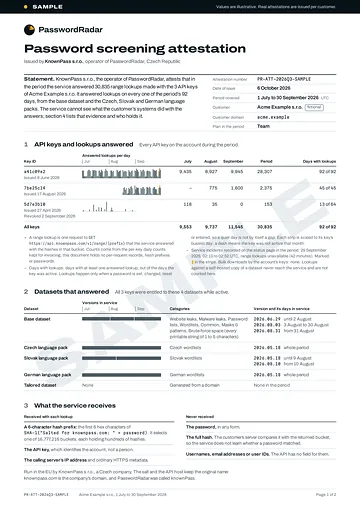
With the Team plan, a per-customer, dated attestation for your auditors. The sample shows exactly what it covers.
Operator
KnownPass s.r.o., a Czech company under EU law and the GDPR, with no investors.
Sub-processors
Hetzner Online GmbH, Germany: the API and the dataset. WEDOS Internet, a.s., Czech Republic: this website. Proton AG, Switzerland: email. Hosting and processors
Exit guarantee
If PasswordRadar ever shuts down, you can download every dataset you are entitled to, free or paid, and keep self-hosting it forever.
The person you’d be trusting with a hash prefix, and the rules the project runs on.
Šimon Podlesný
Staff Security Engineer, Brno
Nine years in DevOps, infrastructure and security engineering at Czech and Slovak tech companies.
MSc, Brno University of Technology.
He runs PasswordRadar through KnownPass s.r.o., alongside a full-time security role. That’s why the check fails open, the data is downloadable and the exit guarantee exists: nothing you run should depend on him alone.
In nine years of incident work the pattern repeats: no MFA, one password everywhere. I can’t change their MFA habits, but I can make their passwords a little harder to guess. When a local bank accepted my already-breached password as a test, I decided to do something about it.
Exit guarantee: if PasswordRadar ever shuts down, customers can download every dataset they are entitled to, free or paid, and keep self-hosting it forever.
PasswordRadar (formerly knownPass) is the product’s new name. The company, KnownPass s.r.o., and its domain keep the original one, which is why the API host and the salt still carry it. Existing integrations keep working unchanged.
One goal: make logins measurably harder to compromise.
Always a free plan
Not everyone can afford premium security. The Free plan stays, whatever else we ship.
Your data stays here
Never sold, and never processed outside this project.
EU company, privacy first
Built and operated under EU privacy rules, by design rather than by checkbox.
Minimal logging
We log only what the service needs to work. Nothing more.
Independent, and built to outlive its author
Run by KnownPass s.r.o., a Czech company with no investors. The reference client is licensed Apache-2.0, and open-sourcing the engine under Apache-2.0 is planned. Dataset licences: data page.
Security over features
Every trade-off resolves towards the safer option, even when it costs us features.
Start free. Pay for tailored data and the evidence auditors ask for.
Early-access prices in EUR, excl. VAT. They may change as early access ends, and if you already hold a key, you get 90 days’ notice before any change.
No enterprise plan, and you never need a sales call to buy. If a call about your NIS2 evidence or your integration would help, the engineer who built PasswordRadar takes it: ask for a call.
Every key includes
1,000 requests a day
Beyond that
€0.01 per request
Paid as
Pay as you go, or prepaid credit
No payment method or credit
Requests over 1,000 a day return 429 with Retry-After
In practice: a 500-person organisation that checks every password change and every login usually stays within the 1,000 requests a day included.
Free
€0no card, no time limit
1,000 requests a day per key
Community support
Full base dataset, same as the paid plans
Bulk download for self-hosting (CC BY-NC 4.0, commercial self-hosting allowed)
Only a salted prefix leaves my server. Why does hosting location matter?
The data flow already protects the password: all we receive is six characters of a salted hash. Hosting location answers a different question: which laws your vendor must obey. PasswordRadar is operated by KnownPass s.r.o., a Czech company under EU law and the GDPR, and the API runs on servers of Hetzner Online GmbH in Germany. The US CLOUD Act reaches providers under US jurisdiction; neither the operator nor the hosting provider is a US company. And what anyone could ask us for is small: key IDs, request times, response codes and latencies, at most 15 days of web-server access logs (IP addresses and hash prefixes), and your account email. Auditors ask about vendor jurisdiction, not only about data flows.
We run Active Directory. Is this for us?
Not for Active Directory itself. There, use what already exists: Microsoft Entra Password Protection and Specops Password Policy both do custom banned-word lists with fuzzy matching. PasswordRadar is for two other jobs: generating the organisation-specific list from your domain instead of typing it in by hand (early access), and screening passwords in non-Microsoft, self-hosted identity providers and custom auth.
What are today’s limits and SLA?
Every key includes 1,000 requests a day. Beyond that, each request costs €0.01, pay as you go or from prepaid credit. Without a payment method or credit, requests over 1,000 a day return 429 with a Retry-After header. No uptime SLA yet: the status page is updated by hand and the infrastructure is monitored but not yet redundant, so design the check to fail open (skip it if we’re unreachable).
Can we use the dataset commercially?
In your own systems, yes, including paid products. The bulk download of the base dataset is licensed CC BY-NC 4.0 with one added permission, commercial self-hosting: screening the passwords of your own staff and of your own product’s users is allowed. What needs a written exemption from the author, Šimon Podlesný, is selling the screening itself: reselling or redistributing the dataset, running it for other organisations (for example as a managed service provider or an identity-hosting provider), or making it a paid feature of a security product. Ask at hello@passwordradar.eu. Tailored and curated datasets are commercial, for paying customers.
Will PasswordRadar tell us when our staff’s passwords leak?
No, and it can’t: the dataset holds no email addresses or usernames, and we never learn whose password you checked. PasswordRadar blocks leaked and guessable passwords when they’re set, changed or used. For alerts about your staff’s leaked credentials, use a breach-monitoring service such as Have I Been Pwned’s domain search or Scattered Secrets alongside it.
Do you ever see the password?
No. You hash the password on your side and send only a six-character prefix of the salted hash. The raw password and its full hash never leave your infrastructure. The whole client is three short steps, so you can check exactly what leaves your systems. The reference client, licensed Apache-2.0, will be published too. The full threat model fits on one page.
What do you store about the passwords you check against?
A salted hash of each password and the categories it was found in. No email addresses, usernames, user IDs or source sites: those are discarded when raw material is processed, before anything reaches the index. We can’t look a person up in the dataset, and neither could anyone who obtained it. Sources, processing steps and retention are on the data and provenance page.
Can I have my password removed from the dataset?
No, and here’s why. The dataset holds no identifiers, so there is no way to tell which entry is yours, and removing a password would stop protecting everyone else who chose it. GDPR recognises this: where a controller can’t identify the person, the access and erasure rights don’t apply to that data (Article 11). Article 11(2) lets a person offer extra information that would identify them in the data, but a password can’t do that: the same password belongs to everyone who chose it. If a password of yours is in there, the fix that helps you is to stop using it, everywhere. If you’re a customer and want your email removed, privacy@passwordradar.eu does that.
How fast is a check?
From Europe, usually under 100 ms: one round trip on an open connection, plus local hashing that takes well under a millisecond. A new connection adds a few round trips, which from Asia or South America comes close to a second, so give the request 2 seconds. If it fails, your auth flow carries on (fail open).
What data do you check against?
20 billion unique passwords and weak patterns, in these categories: website leaks, malware leaks, password lists, common passwords, wordlists, masks and patterns, and every printable string of 1 to 5 characters (about 7.8 billion). The generated patterns count towards that total. In early access, patterns generated from your own domain come on top. The dataset keeps growing.
How is this different from Have I Been Pwned?
Different job. Pwned Passwords is a free list of passwords seen in public breaches, and we recommend it. PasswordRadar adds what a generic list can’t: weak patterns generated from your own domain (early access), language wordlists and masks, a salted hash scheme so lookups can’t be replayed against other services, an authenticated API, and an EU operator with a dated attestation for your auditors.
My CDN or WAF already checks for leaked credentials. Why this?
Keep it. It’s a good control wherever your login traffic passes through that provider. PasswordRadar is for the cases where it doesn’t: self-hosted identity providers, internal applications, and teams that need an EU vendor and evidence for their auditors. It also adds what no generic list carries: weak patterns generated from your own domain (early access), and language wordlists for the people who actually use your product.
Which identity providers does it integrate with?
Today, your own code, with one REST request. Off-the-shelf identity providers such as Keycloak need a small extension or script to make that call. Ready-made integrations for Keycloak, Zitadel, Ory, Authentik, Nextcloud and Supabase Auth are planned, and design partners decide the order.
Will it stay free?
Yes. An always-free plan is one of our principles, not a launch offer. Every key includes 1,000 requests a day, and requests beyond that cost €0.01 on every plan, Free included. Paid plans add language packs, audit evidence and organisation-specific data. If you already hold a key, you get 90 days’ notice before any change affects it.
What do you do with my email?
Deliver your key, send service notices and, occasionally, product updates, with an opt-out in every email. No cookies and no analytics on this site, and we delete your data on request. The whole policy fits on one page.
Start with one email
Self-serve keys aren’t live yet, so a free key takes one email to hello@passwordradar.eu. You’ll usually have it within a day, with no card, and the integration takes about five minutes.
Team and Tailored plans are there when you need language packs, audit evidence or organisation-specific data. Design partners get tailored datasets first.